


Race CommandIQ
3.470.00 Reviews
App Specs
- Version
- 26.2.1
- Updated On
- License
- Free
- Downloads
- 10,000+
- Developer
- Race Communications
- Categories
- House & Home
- Platform
- Android
Screenshots
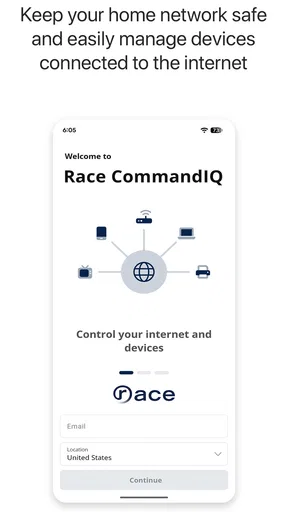
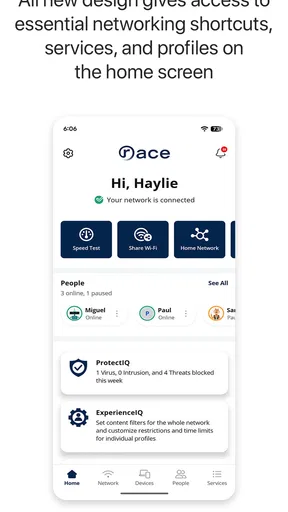
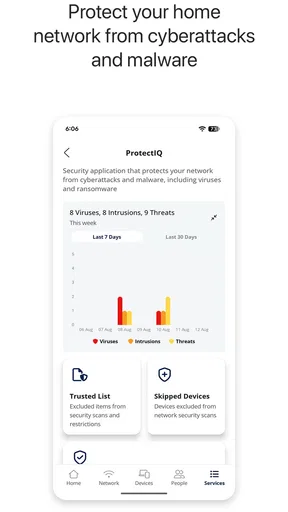
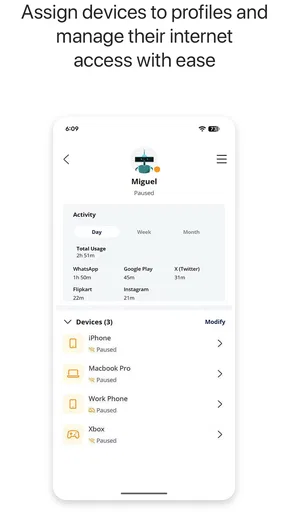
 Analysis by AppCompare
Before installing another home-management app, I would ask a simple question: does it bring together something I already use, or just add one more place to look? Race CommandIQ makes the most sense when Race Communications is already part of your household’s connected-home setup. For those users, a provider-focused control point may make routine checks feel less scattered; for everyone else, the app’s usefulness is harder to justify.
Choose it for a specific household task
I would decide based on the task I want to make easier, not on the broad idea of having a “smart home.” If I need a convenient starting point for managing a Race-connected setup, this app is worth trying. If I mainly want to combine devices from unrelated brands, build intricate automations, or replace every manufacturer app, I would compare broader options first.
That distinction matters in an ordinary home. Someone might want to check the household setup before leaving, then use the same familiar entry point later rather than remembering which app handles which part. The benefit is modest but practical: fewer decisions about where to begin. It is not a reason to expect the app to solve a weak network or an unresponsive device by itself.
Race Communications is the developer behind this free House & Home app. It was released on March 28, 2022, and the current version is 26.2.1 for devices running Android 10 or newer. The age rating is Everyone, which makes sense for a household utility rather than an entertainment app with mature content.
The app has reached over ten thousand installs and holds a 3.4 average from around one hundred eighty ratings, with roughly seventy written reviews. I would read those figures as a sign that the app has a real user base but is not universally loved. That middle-ground rating is important: it suggests that the experience may be perfectly useful for the right Race customer while still leaving room for setup friction, device compatibility issues, or expectations that the app cannot meet on its own.
My strongest takeaway is that this is a service companion first and a general smart-home platform second. If your home already relies on Race Communications equipment or services, having a dedicated control point can be more convenient than treating every connected device as a separate purchase and separate application. If you are looking for a brand-neutral hub that brings together products from many unrelated ecosystems, I would look elsewhere before committing time to it.
How Race CommandIQ fits into everyday home management
I look at Race CommandIQ as a household routine tool, so this section focuses on how to judge whether it genuinely simplifies the moments when someone needs to check or manage the home. A useful next step is to choose one task that currently sends you between apps and see whether a Race-centered starting point makes that routine clearer, rather than assuming a single app should replace every specialist tool.
Worth Reading Before You Choose

Flipboard Shows What News Apps Must Do Beyond the Feed

Switching to Android Auto Means Rethinking Your Driving Routine

Google Calendar Makes a Crowded Week Easier to Manage

Ludo King Makes the Most of the Minutes Between Plans

Baby Panda World Brings Quick Play to Modern Phones, but Its Game Library Feels Busy

ESPN’s Live Game View Makes Following Close Games Easier
The real strength is reducing household switching
Smart-home management becomes tiring when every device has its own application, login, terminology, and notification style. A household may have one app for networking, another for cameras, another for lighting, and yet another for security. A provider-focused tool such as this can be valuable because it gives the home a more consistent starting point.
I find that especially useful for people who are not interested in building elaborate automations. Many users do not want to spend a weekend designing scenes or troubleshooting integrations. They want to open one familiar app, understand what is happening, and make a straightforward change. Race CommandIQ is better suited to that practical mindset than to someone who enjoys experimenting with a large collection of unrelated smart products.
There is also a less obvious benefit for shared homes. A dedicated household app can make the difference between one technically confident person controlling everything and several residents having a clearer way to participate. That does not mean every family member will automatically understand the system, but a focused interface is generally easier to explain than a pile of manufacturer apps.
A realistic morning and evening workflow
Imagine a household leaving for work and school in the morning. Instead of checking several devices individually, the person responsible for the home can use the Race-centered app as the first place to review the connected setup. In the evening, the same person can return to it when they want to confirm that the home is in the expected state. The advantage is not dramatic; it is the accumulation of fewer small steps.
That kind of workflow is where I would judge the app. I would not install it expecting it to transform a home by itself. I would install it to see whether it makes the existing Race experience easier to navigate. If opening it gives me a clear path to the controls I actually use, it earns its place. If I still need several other applications for the important tasks, its role becomes narrower.
A useful setup habit is to decide in advance which actions truly belong in this app. Keep the everyday controls here, and avoid treating it as a replacement for every specialized device application. That approach reduces confusion and makes it easier to identify whether a problem comes from the app, the connected device, or the underlying service.
Where the experience can become frustrating
The main weakness is the same thing that gives the app its focus: it is tied to the Race Communications environment. That can be a strength for existing customers, but it limits the appeal for people who want freedom to mix brands and services. A general smart-home platform may offer broader compatibility or deeper automation options, while Race CommandIQ is more sensible when your household is already organized around Race.
I would also keep expectations realistic about the word “smart.” An app can place controls in one location, but that does not automatically make the underlying home intelligent. The quality of the experience still depends on the equipment connected to it, the reliability of the home network, and how clearly the app presents available controls. When something fails, the app may not be able to solve the underlying issue; it may only show that a device or connection needs attention.
The 3.4 average is another reason I would approach installation with patience rather than assuming everything will be effortless. A rating like that does not tell me which individual issue affected each reviewer, but it does encourage a practical test: install it, connect the services you actually use, and check the most important daily task before reorganizing your whole smart-home routine around it.
What I would check before relying on it
First, I would confirm that the phone or tablet is running Android 10 or later. That requirement is easy to overlook when an older household device is being used as a shared control panel. If the family keeps an old phone in the kitchen or hallway for home controls, its operating-system version may be the first obstacle.
Second, I would test the app from the places where it will really be used. A control panel that works beside the router but struggles from a bedroom or garage may not be convenient in practice. This is not necessarily a flaw in the application itself, but it affects whether the app is dependable for your household.
Third, I would avoid deleting existing device apps immediately. Keep them available until Race CommandIQ has proven that it covers the controls you need. This is a particularly useful trade-off for cameras, security equipment, or devices with advanced settings. The provider app may be the best everyday dashboard while the original manufacturer app remains the better place for detailed configuration.
Finally, I would test the experience with another household member. An app can feel obvious to the person who installed it and confusing to everyone else. If another resident cannot find the basic control without help, the household may need a simpler routine or clearer naming rather than more features.
Who should use it, and who should skip it
I think Race CommandIQ is a good candidate for Race Communications customers who want a central place for their connected-home service and prefer a focused experience over a highly customizable one. It also makes sense for households where one person currently manages all the technology and wants a more approachable way to share everyday control.
It is less convincing for someone who does not use Race Communications. In that situation, the app’s provider-specific identity is likely to matter more than its smart-home concept. I would also steer advanced enthusiasts toward a broader platform if their priority is combining many brands, creating complex routines, or fine-tuning every device from a single universal system.
Renters and casual users may appreciate the free price, but they should still consider how much equipment and service integration they actually have. Installing a home-management app without a meaningful connected setup will not create much value. The best results come when the app solves a specific problem already present in the home.
How it compares with the usual alternatives
The usual alternative is to use each device maker’s application separately. That approach often provides the deepest device-specific controls, and it may be unavoidable for advanced settings. Its downside is fragmentation. Race CommandIQ is more appealing when convenience and a single Race-oriented entry point matter more than having every specialized option in one place.
Another alternative is a broad smart-home platform designed to combine products across manufacturers. That route can be stronger for ambitious setups, especially when a household wants extensive automation or already owns equipment from several ecosystems. The trade-off is complexity: compatibility, account connections, and troubleshooting can become harder to understand.
My preference would be to use Race CommandIQ as the practical front door if my home service matched it, while keeping specialized apps for tasks that require them. That hybrid approach avoids demanding that one application do everything. It also gives the Race app a fair test based on its likely strength: making routine management less scattered.
Small habits that make the app more useful
Use it as the first place to check routine household status, but keep the original device application until you know which settings are available here.
Install it on the household device that will actually be used, rather than assuming the newest personal phone is automatically the best control point.
Teach other residents the few actions they need most often instead of presenting the entire smart-home setup at once.
When something does not respond, separate the possibilities: the app interface, the home network, the Race service, or the connected equipment may each be responsible.
These habits sound simple, but they prevent a common smart-home mistake: adding another application while leaving the original confusion untouched. The goal should be a shorter path to useful actions, not merely a larger collection of icons.
My final recommendation
Race CommandIQ is a sensible free utility for the right household, but I would not call it a universal answer to smart-home management. Its strongest case is practical and specific: Race Communications customers who want a more centralized way to interact with their connected home may find it easier than juggling separate tools.
Its limitations are equally clear. The provider-focused design may not suit people outside the Race ecosystem, and users looking for broad cross-brand control or advanced automation may get more from a general smart-home platform. The average rating also tells me to treat setup and day-to-day reliability as things to evaluate personally rather than assume.
For a low-risk first test, I would identify one routine task that currently sends me to a separate tool, then see whether the Race-centered app makes that task easier without disrupting the existing setup. If it does, I would introduce it to other household members and keep the specialist apps for the settings they still need. If it adds steps or leaves the key task elsewhere, there is little reason to force it into the daily routine.
My verdict is cautiously positive. If Race Communications already plays a central role in your home, I would try Race CommandIQ because the free installation makes a hands-on test reasonable. Start with one or two everyday tasks, confirm that your Android device meets the requirement, and keep specialized apps nearby during the transition. For a Race household seeking less scattered smart-home control, it could become a useful daily companion; for everyone else, the usual alternatives are likely to offer a better fit.
Pros
- Clear view of connected devices and network activity
- Useful tools for checking signal strength and connection quality
- Guest network management is simple and convenient
- Helps identify weak Wi‑Fi areas around your home
- Remote access makes basic network control more flexible
Cons
- Some features depend on a compatible Race Communications gateway
- Advanced settings may be limited compared with dedicated router apps
- Performance can vary with the quality of the internet connection
- Notifications may feel excessive for users wanting minimal alerts
- Account setup and permissions can take a few minutes to complete
FAQs for Race CommandIQ
What is Race CommandIQ and what can I use it for?
Race CommandIQ is a network-management app designed to help users monitor and control compatible home Wi‑Fi systems. After connecting it to a supported router or mesh network, you can usually view connected devices, check network status, manage access, create guest connectivity, and adjust selected wireless settings. Its usefulness depends on whether your internet provider or router model supports the platform.
Is Race CommandIQ compatible with every router or internet provider?
No. Race CommandIQ is not a universal router-management application. It is intended for specific compatible broadband providers, routers, and managed Wi‑Fi systems. Before downloading, check your provider’s instructions or the app listing to confirm compatibility with your equipment. If your router is unsupported, you may be unable to sign in, pair the device, or access the app’s management features.
What features does Race CommandIQ offer for managing my home network?
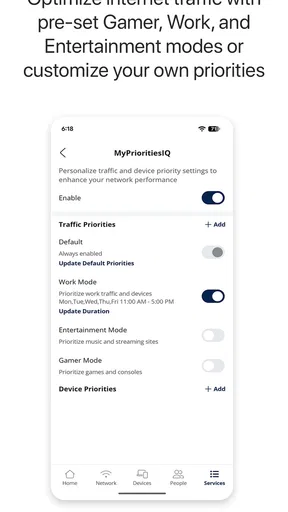
The available tools can vary by provider and hardware, but Race CommandIQ commonly provides an overview of network performance, connected-device management, guest Wi‑Fi controls, parental or access-management options, and basic troubleshooting information. Some versions may also allow users to pause internet access for selected devices or manage profiles. Certain advanced settings may remain restricted to the provider.
Does Race CommandIQ require an internet connection and an account?
Yes, users generally need an active supported internet service and an account associated with the provider or managed Wi‑Fi system. The app communicates with your network equipment through the provider’s platform, so many functions will not work when the service is disconnected or the router is offline. You may also need to verify your identity during setup before controlling network settings.
Is Race CommandIQ safe to use, and what permissions should I expect?
Race CommandIQ is intended to manage your private network, so it may request permissions or account access needed to identify the router, discover connected devices, send notifications, and provide support features. Download it only from an official app store and use your provider’s legitimate login page. Review the privacy policy, protect your account with a strong password, and avoid sharing administrator credentials.


